GTO Wizard: features, pricing plans. Is it worth the money?
Working with poker strategies has long been part of the preparation of most regular players. Today these tasks are solved considerably faster.


One of our first coaches: on the team since the very founding of the project. He prioritizes simple and practical training with an emphasis on real game situations and decision-making over the long run. Val doesn't just "beat the games" as a player, but also instills a systematic approach to the game and discipline in his students.
One of the most popular tools for this kind of work has become GTO Wizard. The program combines ready-made GTO solutions, a trainer for practising in-game situations, analysis of your own hands, and training materials all in one interface. The program has changed the very approach to working with solvers. Instead of long calculations, a player gets the chance to move almost immediately to analysing ranges, comparing strategies, and finding mistakes in their own game.
In this article, we'll break down how GTO Wizard works, what tasks it solves, how it differs from classic solvers, and in which cases its functionality really helps develop strategic thinking.

New breakdowns in your inbox
Subscribe to the FunFarm newsletter: fresh Poker ABC articles and material that helps you grow as a player.
What is GTO Wizard
GTO Wizard is a cloud-based platform for studying optimal poker strategy. It's often called a solver, though that definition isn't entirely accurate. A classic solver calculates each situation directly on the user's computer. The player sets the hand parameters themselves, builds a decision tree, selects bet sizes, and runs the calculations. Depending on the complexity of the tree, the calculation can take anywhere from a few minutes to several hours and requires significant computing resources.
GTO Wizard works on a different principle. For most standard in-game situations, solutions have already been calculated in advance and are stored on the server. When the user selects the spot they need, the program doesn't start a new calculation — it almost instantly loads the ready-made solution. That's why the service works just as quickly on a high-performance computer as it does on an ordinary laptop or even a mobile device.
How GTO Wizard differs from classic solvers
The main difference isn't in the accuracy of the solutions, but in how the learning process is organised. When using a traditional solver, the work usually looks like this:
we create a decision tree
set the players' ranges
configure the possible bet sizes
run the calculation
start analysing the results obtained
In GTO Wizard, most of this preparation has already been done by the developers. The user goes straight to studying the strategy for the chosen spot. This significantly shortens the time between a question arising and getting an answer.
That's why GTO Wizard shouldn't be viewed solely as an alternative to classic solvers. It's more of a tool for day-to-day work on your game, one that saves the user from having to calculate typical situations themselves every time.
At the same time, the solutions themselves remain fairly close to the results from local solvers. Sources used in preparing this article note that the differences in EV between the ready-made solutions in GTO Wizard and the calculations of classic solvers under the same conditions are usually so small that they can be disregarded in a player's practical preparation.
*EV (Expected Value) is a metric that reflects the expected profitability or unprofitability of a specific decision over the long run.
What features does GTO Wizard offer
Although GTO Wizard is most often called a solver, its functionality is significantly broader. The platform combines several independent tools, each of which solves its own task in the learning process.
1. Studying ready-made solutions
This is the program's main mode of operation. We select the spot we're interested in, set the hand parameters, and reproduce the players' actions in sequence. After that, GTO Wizard shows the optimal strategy for the entire range.
During analysis, you can see:
the recommended frequencies of various actions
the distribution of ranges
the equity of individual hands
the expected value (EV) of various decisions
the influence of the board texture on both players' strategies.
*Equity is the mathematical probability that our hand will win the pot in a specific situation at the table.
This approach makes it possible to study not individual combinations, but the patterns on which optimal strategy is built. This is exactly what the developers focus on most: the goal of the program is not the mechanical memorisation of frequencies, but an understanding of the logic behind the decisions.
2. Practice against GTO strategy
Studying a solution is only half the work. The next stage is checking how confidently we can apply these principles on our own. GTO Wizard has a training mode built in for exactly this purpose.
The program generates in-game situations, and the user makes decisions just as they would during a regular session. After each action, the service shows how closely it matches the optimal strategy and explains any deviations made.
3. Analysis of your own hand database
Another important feature is uploading your own hand history. After importing the database, the program automatically analyses the hands and highlights the decisions that deviate most strongly from GTO strategy.
This means you don't have to review thousands of played hands by hand, but instead focus specifically on the situations where EV losses turn out to be the most significant. According to the source materials, the service supports analysis of large volumes of hand history and provides tools for their subsequent review.
Learning at FunFarm, from any level
The GTO Wizard interface
Despite the large number of features, the GTO Wizard interface is built around a single idea: to reduce the time between a question arising and its analysis. Instead of separate programs for calculation, analysis and training, the user gets a single workspace where all the preparation stages are linked together.
On first acquaintance, the number of sections may seem large, but each of them solves a separate task.
Solutions
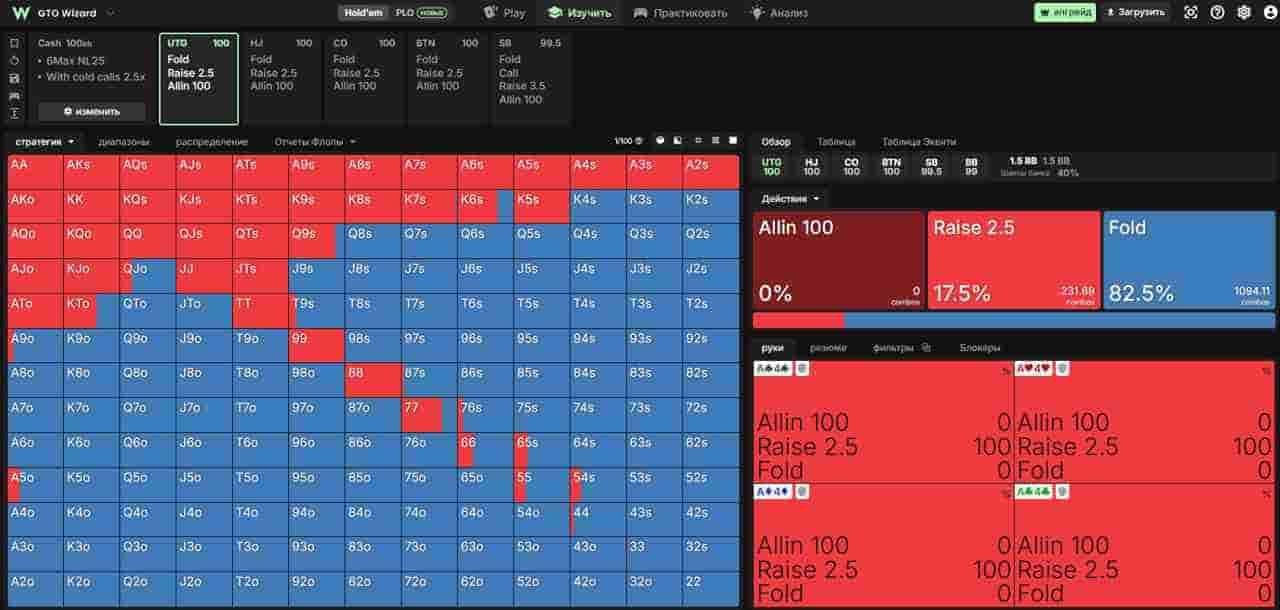
This is the platform's main section, which contains a database of pre-calculated solutions. This is where we can play out the spot of interest step by step and see what the optimal strategy looks like for both ranges.
Instead of individual hands, GTO Wizard shows the entire spectrum of combinations, the frequencies of various actions, the expected value of each decision, and the distribution of ranges across streets. This format lets you study patterns rather than ready-made answers.
Practice
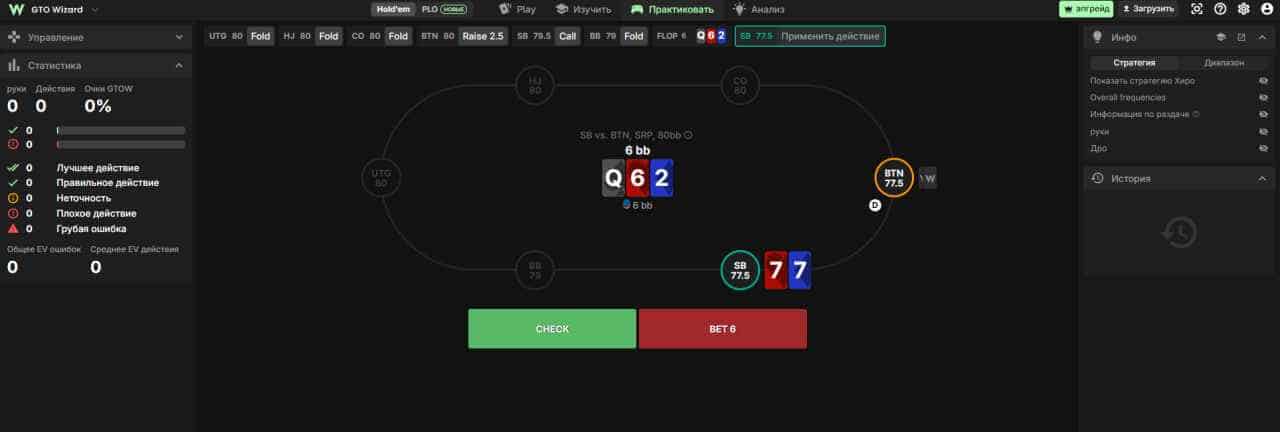
The next section is dedicated to practice. After studying a strategy, it's important to check how well we're able to apply it on our own. To do this, GTO Wizard simulates in-game situations in which we make decisions just as we would during a real session.
After each action, the service compares our choice with the optimal strategy and shows how significant the deviation turned out to be.
This kind of training format is useful for two reasons. Firstly, it allows recurring mistakes to be quickly identified. Secondly, an understanding of range logic gradually forms. Over time, the player begins to recognise similar situations and make decisions not through mechanical memorisation of frequencies, but thanks to an understanding of the strategy's structure.
Analyze
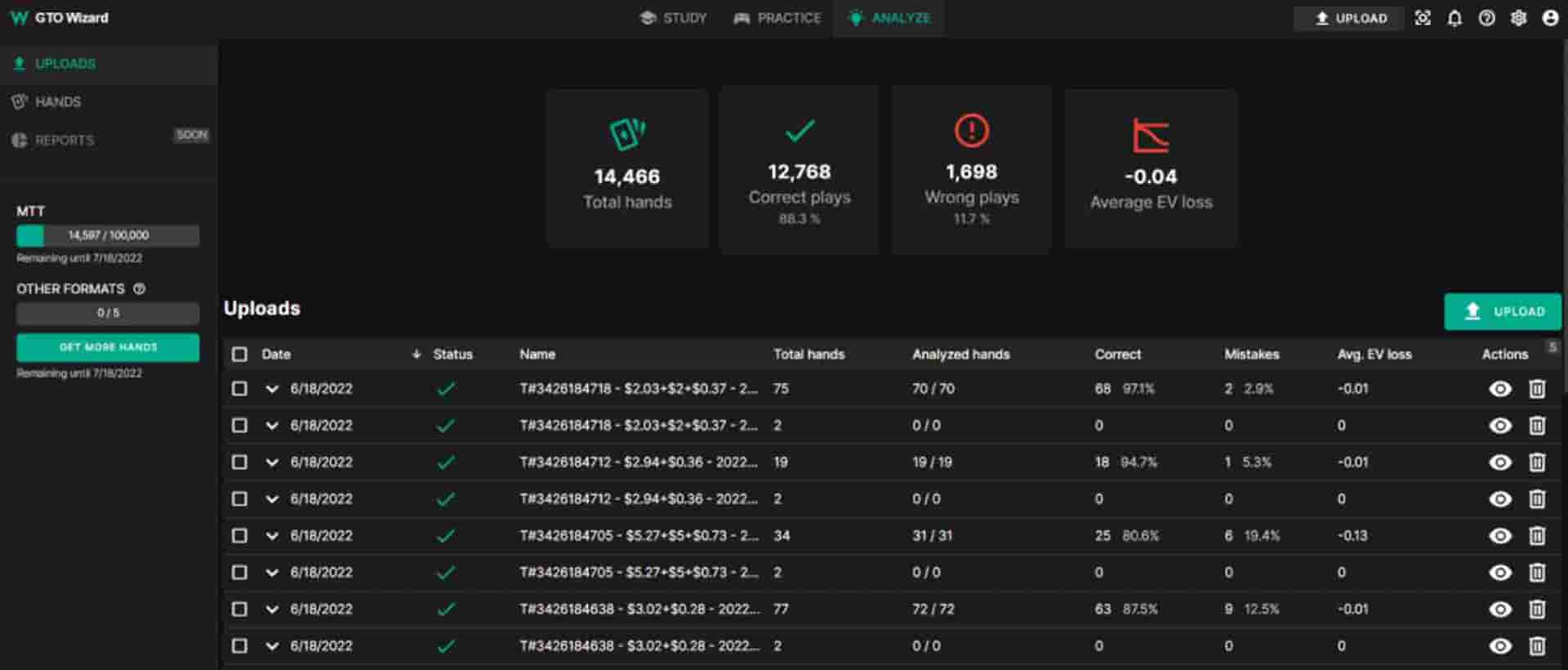
This section is designed for reviewing hands already played. After uploading a hand history, the program automatically compares the user's decisions with its own GTO database and highlights the most significant deviations.
The practical value of this section lies in prioritisation. After a long playing session, the database may contain several thousand hands. It makes no sense to review each one of them by hand. It's much more useful to focus on the situations where mistakes led to the greatest EV losses.
GTO Wizard pricing
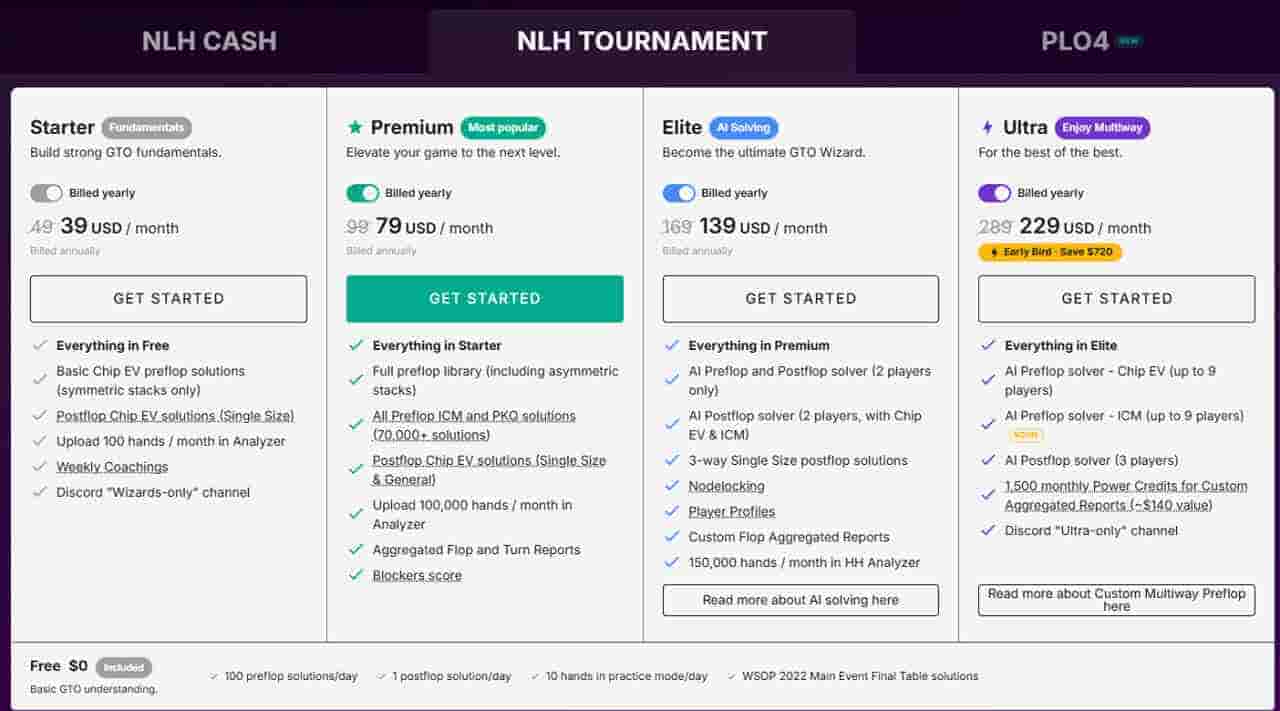
GTO Wizard uses a subscription model. Several pricing plans are available to the user, differing in the range of features, the number of available solutions, and the options for analysing your own database.
The free version allows you to get acquainted with the platform and test its main features, but it has noticeable limits on the number of available spots and training sessions.
Paid plans gradually unlock the expanded library of solutions, hand history analysis tools, additional training modes and other platform features. In the more expensive plans, GTO Wizard AI features and advanced tools for regular work also become available.
Since the subscription structure and pricing change periodically, it's worth checking the current terms on the official GTO Wizard website before subscribing. This approach is in line with the recommendations set out in the technical specification.
Advantages of GTO Wizard
The platform's main advantage lies in its speed of work. We can move almost immediately to analysing the situation of interest, without spending time building a decision tree and running calculations. This is especially convenient for daily work on your own game.
An equally important advantage is the unified ecosystem. Instead of several separate programs, the user gets:
a library of ready-made solutions
a trainer
analysis of your own database
training materials
tools for studying non-standard situations.
This approach makes the preparation process considerably more consistent.
Another advantage is accessibility. Since most of the calculations are performed server-side, a high-performance computer isn't required to use it. All the main features are available through the browser from virtually any device.

Limitations of GTO Wizard
Despite its wide range of features, GTO Wizard can't be regarded as a universal solution for every task. The main limitation is that the platform is focused on studying optimal strategy rather than exploiting specific opponents.
During a real game, most opponents deviate from GTO. Some defend too widely against 3-bets, some rarely bluff on the river, while others, on the contrary, are excessively aggressive. In such situations, maximum EV often comes not from strictly following GTO, but from adapting to a specific player's mistakes.
That's why GTO Wizard's results should be treated as a starting point. First we understand what a theoretically optimal strategy looks like, and only then do we evaluate how profitable it is to deviate from it against a specific opponent.
Another limitation concerns the learning process. Ready-made solutions are easily turned into a set of numbers and frequencies that get memorised without understanding the underlying logic. This approach rarely produces long-term results. It's far more useful to look for patterns: which ranges use big bets, why the strategy changes on different board textures, and which range properties influence the choice of action.
Who is GTO Wizard suitable for
The usefulness of any training tool isn't determined by the number of features it has, but by how well those features match the player's level of preparation.
1. Beginner players
If we're only just getting acquainted with the concept of ranges and the principles of GTO, the programme can be a good way to see what an optimal strategy looks like in standard situations. However, it's not worth trying to use all the platform's capabilities right away. At this stage, it's much more important to understand the basic patterns than to study complex decision trees or analyse the tiniest differences in EV.
2. Regular players
It's precisely for this category that GTO Wizard reveals most of its potential. Regularly working with a hand database, studying typical spots and practising decisions makes it possible to find recurring mistakes faster and work systematically on correcting them. With daily practice, the time savings compared to classic solvers become especially noticeable.
3. Coaches and professional players
For players who regularly carry out in-depth strategy analysis, GTO Wizard is convenient to use as a tool for quick access to ready-made solutions. That said, it's not always possible to give up classic solvers entirely.
If you need to explore a non-standard scenario or build a complex decision tree yourself, local programmes still retain their advantages. That's why, at a high level, GTO Wizard more often becomes part of the workflow rather than the sole tool for analysis.
Conclusion
GTO Wizard shouldn't be viewed as a programme that will automatically make your game stronger. Its main value lies elsewhere — it significantly shortens the path from a played hand to understanding the correct strategy.
Instead of building decision trees and carrying out lengthy calculations, we move almost straight to analysing ranges, comparing different lines and looking for our own mistakes. This makes regular work on your game significantly faster and more convenient.
At the same time, the platform's effectiveness depends not so much on the number of available features as on how we use them. If we limit ourselves to mechanically memorising frequencies, the benefit will be small. But if we treat the solutions as a way to understand the logic behind range construction and the reasons for choosing different lines, GTO Wizard becomes a fully-fledged learning tool.
That's precisely why the platform remains one of the most popular among players who strive to systematically develop their strategy and regularly analyse their own game.
And if you want to understand the logic of the game rather than blindly follow the solver's advice, apply to FunFarm.

Free course · FF Start
Choose your tools wisely
Find out which software a beginner really needs and at what stage it starts to pay off.